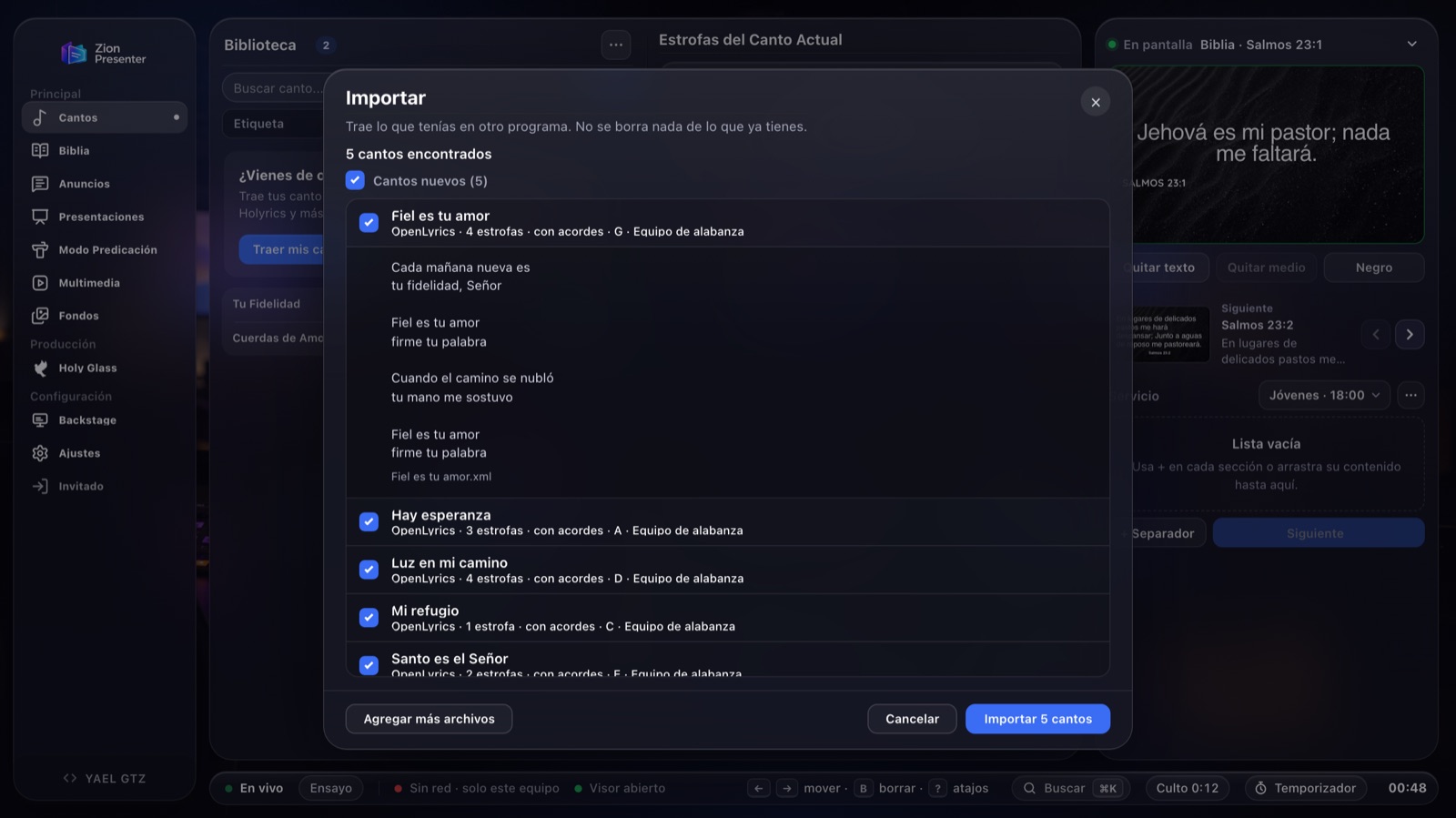
Zion Presenter reads libraries from EasyWorship, ProPresenter, OpenLP, OpenSong, Holyrics and ChordPro, and Bibles from e-Sword, MySword and MyBible. You see every song before you import it, and nothing you already have is ever deleted.
In Songs, open the Library’s ⋯ menu › Import. With an empty library, you can also use “Import my songs.”
2
Choose your app
Zion tells you which folder that app keeps your songs in, or how to export them.
3
Select the files
One, several or a .zip. On the web and on Windows you can also drag in the whole folder.
4
Review and import
You see each song with its lyrics, its key and whether it has chords. Uncheck the ones you don’t want and you’re done.
Where your songs are
The same directions the app gives you when you pick each one.
EasyWorship
2009, 6 y 7
Close EasyWorship.
Open Public Documents › Softouch › EasyWorship › Default › v6.1 › Databases › Data (EasyWorship 7 uses the same folder).
Select Songs.db and SongWords.db together, or drag in the Data folder.
A saved service (.ewsx or .ews) works too, with its songs in order. For EasyWorship 2009, select Songs.DB and Songs.MB from its Databases › Data folder.
ProPresenter
4, 5, 6 y 7
Open the ProPresenter folder in Documents, then open Libraries.
Select the .pro files in your library, or drag in the folder.
To bring a playlist with its order and keys, export it as .proplaylist.
For ProPresenter 4, 5 and 6, use .pro4, .pro5 or .pro6 files, or playlists exported as .pro6plx.
OpenLP
OpenLyrics
In OpenLP, go to File › Export › Song.
Select the songs (or “Select all”) and a folder to save them in.
In Zion, select the .xml files it created, or drag in the folder.
OpenSong
Songs folder
Open the OpenSong folder (usually in Documents).
Drag in the Songs folder, or select the files inside it. They have no extension.
Holyrics
JSON or TXT
Export your songs from Holyrics as JSON or TXT.
In Zion, select the file it created.
Holyrics .mufl files are encrypted and cannot be read. Use JSON or TXT.
ChordPro or text
.cho, .chordpro, .crd, .txt and .rtf
One song per file.
Leave a blank line between verses. Chords above the lyrics or in brackets are detected automatically.
Select the files, or a .zip containing them.
If your app isn’t listed here, export your songs as text and bring them in this way.
Your Bibles too
In the same Import window, open the Bibles tab, choose the app and the file, and Zion adds it to your versions. An imported Bible is saved on that device only.
Protected modules cannot be read; unprotected ones can. Use Bibles that are in the public domain or that you have permission to use.
e-SwordA .bblx file, in Documents or in Program Files (x86) › e-Sword.
MySwordA .bbl.mybible file, in the mysword › bibles folder on your phone.
MyBibleA .SQLite3 module from the MyBible folder, or the .zip you downloaded.
OpenSongAn .xmm or .xml file from the OpenSong folder.
XMLZefania, OSIS, USFX or Beblia. Many public domain editions are available, for example at eBible.org.
What comes across and what doesn’t
Comes into Zion
The lyrics, in the order they are sung: if the chorus repeats, it repeats.
Chords, when the file includes them (OpenLP, OpenSong, ChordPro and ProPresenter 7).
Key, tempo, author and themes, if the app saved them.
The songs in a ProPresenter playlist or an EasyWorship service, in order.
Stays in the other app
Backgrounds, images and videos.
Layouts, fonts and transitions. In Zion you choose the style once and it applies to all your songs.
A translation into another language inside the same song: only the original lyrics are imported.
Frequently asked questions
Will I lose what I already have in Zion?
expand_more
No. Importing only adds songs, or replaces the ones you choose. It never removes anything from your library.
What about the songs I already have?
expand_more
Zion compares them by title. If you already have the same song, it comes unchecked. If the lyrics differ, you can see both and choose to skip it, replace it or keep both.
Are my files uploaded to the internet?
expand_more
No. Files are read on your device and are never sent to a server to be converted. If you use an account, the songs you import are saved to it like any other song.
Does it work on Windows, Mac and the web?
expand_more
Yes, it is the same importer on all three. On Mac you select the files in the folder instead of the folder itself.
Does it cost anything?
expand_more
No. Zion Presenter is free, and so is importing.
EasyWorship, ProPresenter, OpenLP, OpenSong, Holyrics, e-Sword, MySword and MyBible are trademarks of their respective owners. Zion Presenter is not affiliated with them; it only reads the files those apps save or export.